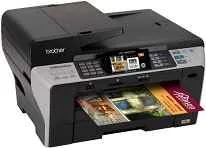
Drivers para Brother MFC-6890CDW
Si necesitas el driver de Brother MFC-6890CDW, estás en el lugar correcto. Aquí puedes descargar la última versión del controlador oficial de Brother para tu impresora Brother MFC-6890CDW. Compatible con Windows, Mac OS, Linux, este driver te permitirá aprovechar al máximo las funciones de impresión, escaneo y copia de tu equipo Brother.
Descargar drivers
Ver guía de instalación para Windows ↓
| Archivo | Tamaño | |
|---|---|---|
| Full Driver and Software Package for Windows 32-bit and 64-bit | 44.20 MB | ⬇ Descargar |
| Full Driver and Software Package for Windows 32-bit and 64-bit | 43.41 MB | ⬇ Descargar |
| Brother MFC-6890CDW Full Driver and Software Package for Windows 32-bit and 64-bit | 41.52 MB | ⬇ Descargar |
| Printer Driver and Scanner Driver for Local Connection for Windows 32-bit | 15.73 MB | ⬇ Descargar |
| Printer Driver and Scanner Driver for Local Connection for Windows 64-bit | 16.21 MB | ⬇ Descargar |
| Brother MFC-6890CDW Printer Driver and Scanner Driver for Local Connection for Windows 32-bit | 15.62 MB | ⬇ Descargar |
| Printer Driver and Scanner Driver for Local Connection for Windows 64-bit | 16.11 MB | ⬇ Descargar |
| Printer Driver and Scanner Driver for Local Connection for Windows 32-bit | 7.40 MB | ⬇ Descargar |
| Brother MFC-6890CDW Printer Driver and Scanner Driver for Local Connection for Windows 64-bit | 7.61 MB | ⬇ Descargar |
Ver guía de instalación para Mac OS ↓
| Archivo | Tamaño | |
|---|---|---|
| Printer Drivers for macOS | 28.10 MB | ⬇ Descargar |
| Printer Drivers for macOS | 28.11 MB | ⬇ Descargar |
| Brother MFC-6890CDW Printer Drivers for macOS | 28.43 MB | ⬇ Descargar |
| Printer Drivers for macOS | 29.53 MB | ⬇ Descargar |
| Printer Drivers for macOS | 29.28 MB | ⬇ Descargar |
| Brother MFC-6890CDW Printer Drivers for macOS | 39.53 MB | ⬇ Descargar |
| Printer Drivers for macOS | 37.47 MB | ⬇ Descargar |
| Printer Drivers for macOS | 29.22 MB | ⬇ Descargar |
| Brother MFC-6890CDW Printer Drivers for macOS | 35.56 MB | ⬇ Descargar |
| Scanner Drivers for macOS | 2.28 MB | ⬇ Descargar |
| Scanner Drivers for macOS | 293.09 MB | ⬇ Descargar |
| Brother MFC-6890CDW Scanner Drivers for macOS | 293 MB | ⬇ Descargar |
| Scanner Drivers for macOS | 293.07 MB | ⬇ Descargar |
| Scanner Drivers for macOS | 294.43 MB | ⬇ Descargar |
| Brother MFC-6890CDW Scanner Drivers for macOS | 6.53 MB | ⬇ Descargar |
| Scanner Drivers for macOS | 4.89 MB | ⬇ Descargar |
| Scanner Drivers for macOS | 2.08 MB | ⬇ Descargar |
Ver guía de instalación para Linux ↓
| Archivo | Tamaño | |
|---|---|---|
| LPR Printer driver for Linux | 2.42 MB | ⬇ Descargar |
| CUPSwrapper Printer driver for Linux | 15.74 kB | ⬇ Descargar |
| Scanner driver for Linux | 59.35 kB | ⬇ Descargar |
| Scanner driver for Linux | 69.94 kB | ⬇ Descargar |
| PC-FAX driver for Linux | 45.15 kB | ⬇ Descargar |
| LPR Printer driver for Linux | 2.42 MB | ⬇ Descargar |
| CUPSwrapper Printer driver for Linux | 14.21 kB | ⬇ Descargar |
| Scanner driver for Linux | 55.48 kB | ⬇ Descargar |
| Scanner driver for Linux | 66.06 kB | ⬇ Descargar |
| PC-FAX driver for Linux | 38.30 kB | ⬇ Descargar |
Descarga segura del driver de Brother MFC-6890CDW
Todas las descargas de drivers de Brother MFC-6890CDW en nuestra web son seguras y verificadas. No añadimos software adicional ni publicidad engañosa. El archivo que descargas es el controlador oficial de Brother, listo para instalar.
Ofrecemos 36 drivers compatibles con Windows, Mac OS, Linux. Si no estás seguro de qué versión necesitas, te recomendamos descargar la más reciente para tu sistema operativo, ya que incluye las últimas correcciones y mejoras.
Una vez instalado el driver, reinicia tu ordenador para que los cambios surtan efecto. Tu impresora Brother MFC-6890CDW debería ser detectada automáticamente y estar lista para imprimir.
Escanea tu sistema y encuentra el controlador exacto para tu Brother MFC-6890CDW.
Detectar driver automáticamenteCómo instalar el driver de Brother MFC-6890CDW
Windows
- Descarga el driver de Brother MFC-6890CDW para Windows desde la tabla superior.
- Haz doble clic en el archivo descargado (.exe) para iniciar la instalación.
- Sigue las instrucciones del asistente de instalación.
- Conecta tu impresora Brother MFC-6890CDW al ordenador por USB o WiFi.
- Reinicia el ordenador si el instalador lo solicita.
Mac OS
- Descarga el driver de Brother MFC-6890CDW para Mac desde la tabla superior.
- Abre el archivo descargado (.dmg) y ejecuta el instalador.
- Ve a Preferencias del Sistema > Impresoras y Escáneres.
- Haz clic en "+" para añadir tu impresora Brother MFC-6890CDW.
Linux
- Descarga el driver de Brother MFC-6890CDW para Linux desde la tabla superior.
- Abre un terminal y navega a la carpeta de descarga.
- Instala con:
sudo dpkg -i nombre-del-archivo.debosudo rpm -i nombre-del-archivo.rpm - Configura la impresora desde el panel de configuración de tu distribución.